IverTabs
A project handoff can look complete and still leave the next person stranded. The files are in a shared folder, the task list is long, and a message says everything is ready. Yet the recipient still cannot tell which draft matters, what has been approved, or what they should do first. The problem is usually missing context rather than missing effort.
A useful handoff answers a practical question: could someone continue this work without reconstructing your last three weeks? You do not need a new platform or an elaborate manual. Start with a short entry document that explains the present situation, points to the right materials, and names the next decision. Add supporting detail only where the work needs it.
This guide offers a structure for everyday projects, freelance work, volunteer activities, and temporary cover during an absence. The examples are illustrative. For work with formal security, safety, or approval requirements, use the required organizational process and adapt these notes around it.
Start with what is actually being handed over
Before describing the project, decide what responsibility is changing. Are you asking someone to finish a draft, monitor incoming requests, deliver an event, or own the entire project? Those are different assignments. A folder of finished designs does not explain whether the recipient should publish them, review them, or wait for approval.
Write a scope sentence: “This handoff covers preparing and sending the workshop materials; venue booking remains with the coordinator.” Then identify the recipient and when the change takes effect. If you are only asking for a review, say so. Do not imply that sending a document automatically transfers ownership.
Also state what completion looks like. “Finish the guide” leaves room for several interpretations. “Provide a reviewed PDF and an editable source file in the delivery folder” gives the next person a concrete target. The definition should match the actual agreement, not introduce new responsibilities in the handoff.
Create one short Start Here page
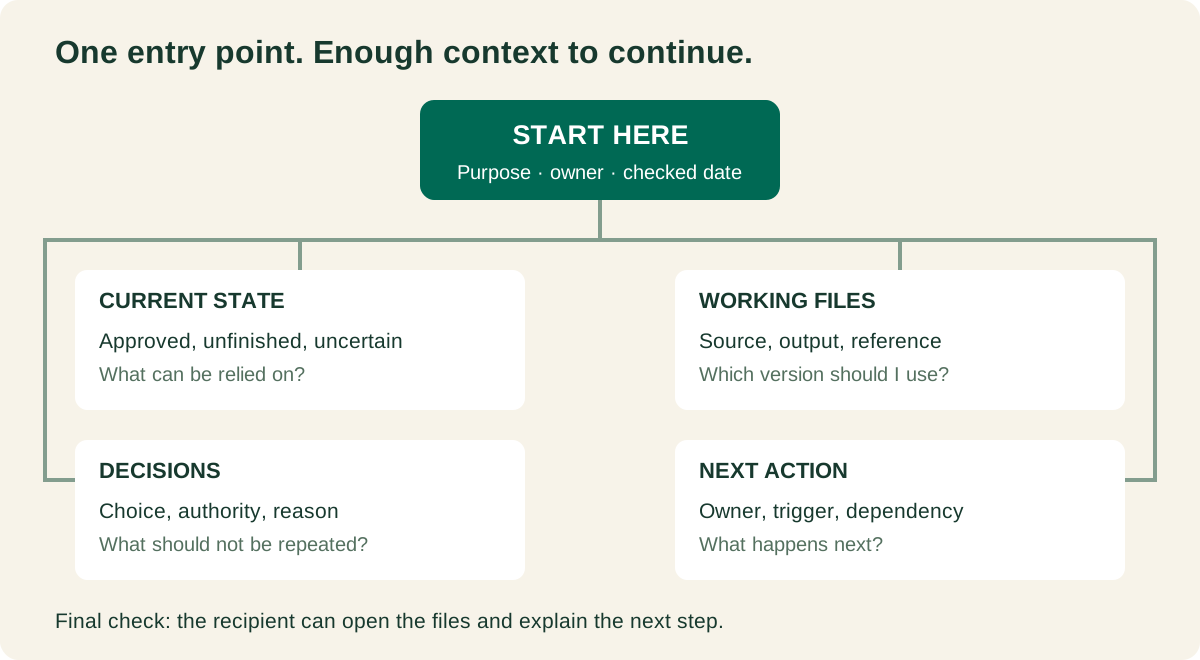
The entry page should help a reader orient themselves before opening a collection of files. Use the project name, a one-sentence purpose, the current owner, the new owner, and the date the summary was checked. Then describe the current state in plain language. Keep the most consequential information close to the top.
A helpful opening might read: “The workshop outline is approved. The participant handout is still a draft because the venue details are unconfirmed. The next action is to obtain those details before the handout goes for review.” That tells the reader what is solid, what is unfinished, and where to begin.
For a small assignment, aim for a summary that can be understood in a few minutes. This is a design goal, not a strict page limit. A short summary can link to a longer operating procedure. The reader should not have to choose between a cryptic note and a fifty-page history just to discover the next step.
Separate completed work, open work, and uncertainty
A single label such as “almost done” hides important differences. List the main deliverables individually. Describe each with an observable state: drafted, reviewed, approved, delivered, or awaiting a named input. Use the vocabulary your team understands, and explain any label that could be mistaken for permission to proceed.
Keep uncertainty visible. “Waiting for a response” is different from “we have not asked yet.” “The attachment has not been checked” is different from “the attachment is missing.” This precision prevents the recipient from acting on an assumption that looks like a fact.
Avoid inventing percentage estimates to make the handoff seem tidy. A project described as 90 percent complete might still depend on a decision that changes everything. A short account of the remaining work is more useful than an impressive number with no agreed meaning.
| Item | Current state | Next action |
|---|---|---|
| Workshop outline | Approved by the coordinator | Use as the content reference |
| Participant handout | Draft; location details unresolved | Request the confirmed room details |
| Delivery folder | Created; recipient access untested | Ask the recipient to open it |
Make the correct files obvious
Choose one working location and link directly to the documents that matter. Do not make someone inspect every file in an archive to decide which one is current. Beside each important link, describe its role: editable source, review copy, approved output, reference material, or historical record.
Suppose a folder contains “handout-final,” “handout-final-new,” and “handout-revised.” Instead of adding another filename, identify the current working document in the Start Here page. Follow any existing naming convention. If the folder is yours to organize, move clearly superseded copies into an archive rather than leaving them beside the current draft without explanation.
Do not delete uncertain material merely to make the handoff look clean. Keep a clearly labeled historical area when needed. If a recipient needs the source document as well as the exported PDF, list both. A readable finished file and an editable working file serve different purposes.
Preserve the decisions that would otherwise be repeated
You rarely need a transcript of every discussion. Record the few decisions that explain why the project looks the way it does. Include what was decided, who had authority to decide it, and any condition that could reopen the question. Link to the existing approval record when one exists.
For example: “The handout uses a two-page format because participants will print it at home. A longer version was considered but not approved.” This small note helps the recipient avoid spending an afternoon expanding a document that needs to stay short.
Keep decisions separate from your suggestions. “The coordinator approved the two-page format” is a different statement from “I think two pages would be easier.” When evidence is missing, describe the uncertainty and identify who can confirm it. Do not turn a remembered preference into a formal approval.
Give the next action an owner and a trigger
“Continue working on the project” is too broad to guide someone arriving cold. Write the first meaningful action in concrete terms. For the workshop example, it might be: “Ask the coordinator to confirm the room number, then insert it into the highlighted section of the handout.”
Attach an owner to the action, with their agreement. Add a real deadline if one exists, and distinguish it from a preferred date. If the action depends on an event rather than a date, name the trigger: after approval arrives, once access is granted, or when the missing information is confirmed.
Explain what to do if the dependency does not arrive. That might mean notifying the coordinator, pausing distribution, or using an already approved alternative. Do not silently choose a fallback that changes the agreed scope. The point is to make the waiting condition clear, not to remove every decision from the recipient.
Test access from the recipient's side
A link that opens for you is not a complete access check. Ask the recipient to open the working folder and the essential documents using their normal account. Where editing is part of the assignment, confirm that they have the appropriate permission. Viewing a file does not prove they can update it.
Follow your organization's sharing rules. Avoid putting passwords, recovery codes, or secret keys into a general handoff document. If the role requires access to a service, arrange it through the approved account or access-management process. The handoff can explain where access is managed without exposing the credential itself.
Check ownership as well as access. A project should not depend on a personal account that will become unavailable immediately after the handoff. If an ownership change is necessary, identify it as a specific task and verify that it was completed. Do not assume a copied link changes who controls the original material.
A worked example: handing over a small workshop
Imagine you have prepared materials for a community workshop but someone else will finish the handout and distribute it. The following is an illustrative handoff, not a record of a real project. Notice that it keeps completed work, unfinished work, and permission to send separate.
Project: Introductory digital filing workshop.
Purpose: Help participants leave with a simple folder structure and a short file-naming rule they can use.
Transfer: The incoming volunteer will finish and distribute the participant handout after the coordinator approves the final copy. Venue arrangements remain with the coordinator.
Current state: The outline is approved. The editable handout follows that outline, but the room details are not confirmed. The PDF in the Review folder is an earlier draft and must not be distributed.
Working materials: Start with the editable handout in Working. Use the approved outline in Reference. Place the reviewed PDF in Delivery once it has been approved.
Next action: Obtain the room details from the coordinator and update the marked section. Then request a final content review.
Open risk: If the room details are still unconfirmed at the agreed review point, tell the coordinator. Do not guess a location or send the earlier PDF.
Acceptance check: The incoming volunteer can open and edit the handout, identify the approved outline, and explain what must happen before distribution.
This handoff does not repeat the entire workshop plan. It points to that plan and explains the remaining work around it. The incoming volunteer can act without mistaking an earlier PDF for a finished deliverable. If the project grows, add supporting documents under the same entry point rather than expanding the summary into a complete archive.
Use this compact handoff template
Copy these prompts into a document your recipient can access. Replace every prompt with an actual answer, or write “not applicable” where that is genuinely appropriate. Remove unused fields rather than leaving unexplained blanks. A completed template should read like a guide to this project, not a generic administrative form.
PROJECT AND PURPOSE:
What are we delivering, and for whom?

TRANSFER:
What responsibility changes, to whom, and when?
What remains outside this handoff?

CURRENT STATE:
What is approved? What is unfinished? What is uncertain?

WORKING MATERIALS:
Current source:
Approved output:
Reference or decision record:
Archive:

NEXT ACTION:
Action, agreed owner, deadline or trigger:
Dependency and agreed fallback:

ACCESS AND SUPPORT:
Required access and whether it was tested:
Who can answer a question or make the pending decision?

ACCEPTANCE:
What must the recipient be able to find or do?
Open issues and the agreed follow-up:
Summary checked on:
If a field needs several pages, keep its answer short and link to the detail. For example, the decision record can live elsewhere while the summary names the decision that affects the next action. This keeps the template usable without throwing away the supporting evidence.
Run a short recipient-led walkthrough
Once the draft handoff is ready, let the recipient navigate it. Ask them to find the current file, explain the next action, and identify the unresolved question. Watch where the document becomes unclear. This is a test of the handoff, not a test of the recipient's intelligence or effort.
If you have to explain something verbally, add the useful part to the document. Otherwise the clarification disappears when the conversation ends. Prefer fixing the label, link, or missing sentence over adding a long paragraph that the next reader may skip.
For a temporary absence, agree on the scope of support. For a permanent transfer, agree on when responsibility changes and what remains unresolved. A brief acknowledgment can record that the materials were received and checked. It should not imply that the recipient has approved every historical choice or accepted responsibilities that were never discussed.
Keep the handoff current until the transfer is complete
Preparing the document does not freeze the project. If a decision changes or a new file replaces the old one before the transfer, update the entry page. Use a visible checked date and a small change note when the difference matters. Tell the recipient about a consequential change rather than hoping they reopen the document.
Keep one maintained summary instead of circulating several competing copies. An attachment can be useful for a snapshot, but make clear whether it is the current working version or a record of an earlier state. The same principle applies to printed notes: they should not quietly become the only place where a new decision is recorded.
After acceptance, follow the normal retention and access rules for the project. Archive your personal working notes if appropriate, and remove temporary access only through the agreed process. The goal is a clean transfer of responsibility with enough context to continue, not the disappearance of every trace of the previous work.
Common questions
How long should a handoff document be?
As short as it can be while allowing the recipient to act. A small task may need a few paragraphs; a complex role may need a summary plus several procedures. Judge it by what the recipient can find and do, not by page count.
What if nobody has been assigned to receive it?
Prepare the materials and identify the unassigned responsibility explicitly. Ask the appropriate coordinator or manager to name an owner. An organized folder cannot accept responsibility, and silence is not confirmation that someone has taken over.
Can I use the same approach for my future self?
Yes. Before pausing a personal project, leave yourself the current state, the correct file, the next action, and the reason behind any important decision. You can omit the transfer agreement, but the need for useful context remains.
What is the fastest useful check before sending?
Read the summary as if you had not worked on the project. Can you tell what is approved, open the correct material, and identify one next action? Fix those three gaps first. Then ask the recipient to confirm access and point out anything still unclear.